In this article
I've worked as an external consultant for most of my tech career. Onboarding often goes something like this:
Here's the documentation. Here's who you can talk to. You have two weeks to sort it out. We expect you to contribute next sprint. Good luck.
And the person you can talk to is always busy. I get it. They have their own work and KPIs, and externals come and go all the time. That leaves me working out much of the setup from the documentation.
I don't have much headspace for keeping track of all those instructions. I can remember Magic: The Gathering rules even though it's been eons since I played, and stupid school jokes from even further back. But I can read a documentation page in a minute and forget half of it by the time I switch tabs.
I'm the kind of developer who will put in a lot of work now to avoid hunting through those docs again later. If you've ever picked up Automate the Boring Stuff with Python and automated an Excel spreadsheet, you probably know what I mean.
I was already using Claude for coding, but I still had to follow the links people sent me and attach the docs for Claude to read. Could it look through those docs itself? Could it help me work through the company's setup without every question becoming another message to someone who was already busy?
On one project, I had about 20 tabs open trying to understand a deployment pipeline. The template came from an internal portal. It ran on GitHub Actions, needed to produce compliance documents, and fetched secrets from a separate service. Each part had its instructions in a different repository. Without those internal instructions, Claude often suggested fields or values that didn't fit our setup.
Letting Claude read the docs
I started with a lean JavaScript MCP server on my laptop. I downloaded the documentation repositories, and the server let Claude read their Markdown files without me attaching them to each conversation.
Whole files gave Claude a lot of text unrelated to the question I was asking. I started storing smaller chunks in SQLite and using its full-text search to rank and return passages that matched the query. I then added repository sync so I wouldn't have to keep downloading and indexing the docs by hand.
I could get useful answers from individual repositories. For the deployment setup, though, I still had to find the missing instructions in other repos and point Claude to them.
Moving it off my laptop
The AI platform team then asked me to make it available to other teams. Their MCP registry required a remote server.
A local checkout would also let Claude search the files and return short passages. That would still leave each developer assembling the collection and keeping it up to date. I wanted people to connect from their coding clients without repeating that setup.
I moved fetching and indexing into a separate service. It reads the repositories, splits the docs into chunks and stores them with their document embeddings in a shared database. The MCP service answers searches from that shared index.
When I checked the shared index in October 2026, it held 2,897 documents across 33 repositories.
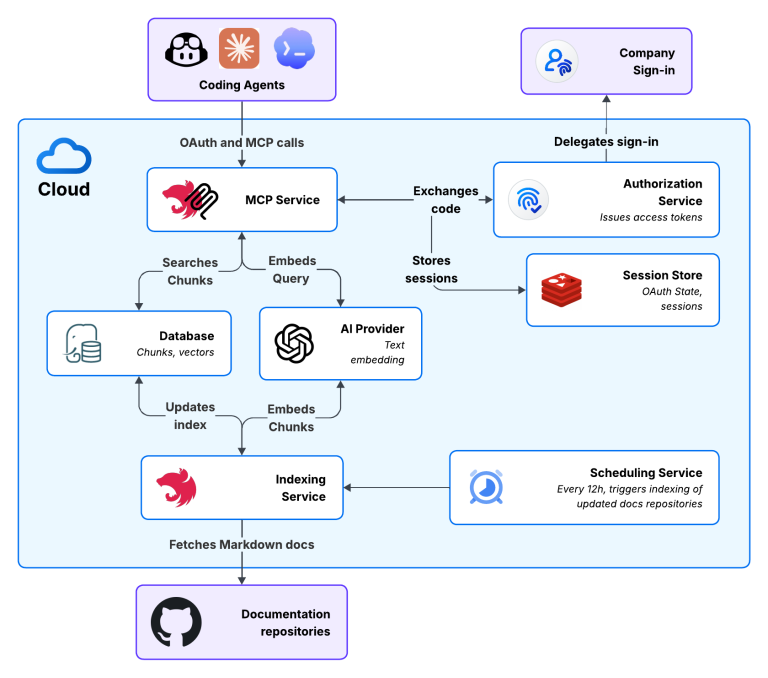
Open the full-size architecture diagram
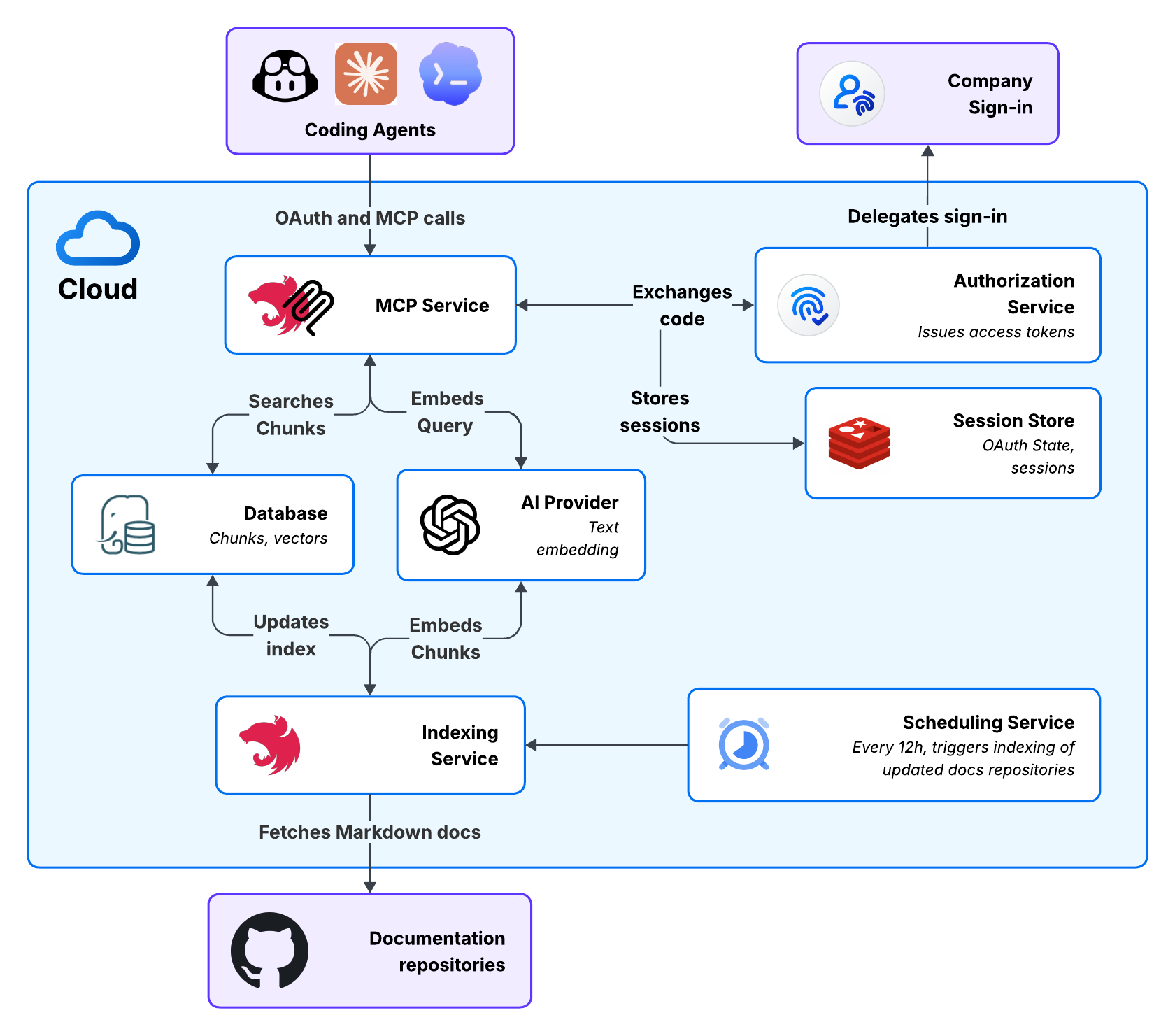
Getting sign-in back to the client
I added an OAuth layer so developers could sign in with their company account and get a token for calling the tools.
A redirect that worked in Claude could fail in Codex. A successful sign-in page in the browser didn't tell me whether the coding client had received the result. I had to check the whole round trip for each client.
For web and localhost callbacks I could use an HTTP redirect. The native-client callback I supported needed a small browser page to hand control back to the app. I tested it through to the message telling the user they could close the window.
Signing in gives the user access to this service. It doesn't make the service inherit that user's permissions on each source repository.
Following a clue into another repository
Let's say we need to deploy a new project. So our question is: "Where does the deploy step get its credentials, and what do I need to set up first?"
Searching our fictional docs for deployment credentials gives Claude this
passage from delivery-guide/pipeline/deploy.md:
## We know the entry is called deploy-credentials, but not how to create it. Claude
can search for create deploy-credentials and find the setup instructions in
another repository, access-guide/secrets/project.md:
## Claude gets the repository, path and heading with each passage, so it can ask for the full file when it needs more context. The server checks the repository and path before fetching it. Claude decides what to look for next.
I also needed search to work before I knew the terms used in the docs. In the later version, I combined word matching with vector search using Reciprocal Rank Fusion, or RRF. It combines the two result lists using each chunk's rank, with a limited pool of candidates from each search.
In a small comparison during the proof of concept, the results were mixed:
- For a question about skipping a pipeline step's secret lookup, lexical search put the relevant procedure second. RRF put it first.
- For a registry login command, lexical search put the exact command document first. RRF led with an onboarding document and ranked the command document lower.
- For a registry upload flow, both methods returned the same leading document.
Getting the project deployed
With the later version, the agent produced a pipeline that deployed the application and fetched its secrets, close to one shot.
For that project, I still had to tell the agent that some template phases, such as acceptance and integration, needed to be turned off. The docs didn't cover that case, and we went through another iteration.
Token costs at enterprise scale
The documents an agent reads share its context window with the code, errors and decisions from the rest of the task. Large responses leave less room for that work and can bring compaction sooner. In Claude Code, compaction summarizes the conversation. If a later step needs an exact instruction that the summary left out, the agent may have to retrieve it again.
Suppose 1,000 active developers each make 10 documentation requests a day. If the agent can answer a question with 5,000 tokens of selected passages instead of 20,000 tokens of full files, that is 15,000 fewer input tokens per question. At Anthropic's public uncached-input prices, Opus 5.5 costs $4 per million input tokens. That would make the input-cost difference $0.06 per request.
Over 22 working days, that would add up to $13,200 a month. For 10,000 active developers under the same assumptions, the input-cost difference would be $132,000 a month.
Final thoughts
I built this because I was fed up with onboarding, and it's now used by multiple teams in the company. Returning smaller, useful passages could also reduce what we spend on model input.
And this was just internal documentation. I expect companies using agents across more workflows to pay closer attention to how much context they're sending and what it costs.
Pick one task your agents repeat and look at the context they receive. How much of it do they need to finish the task?